Cloud DJ softwarethat goes live on your station
Radiocast Decks puts two decks, a full mixer and sampler pads in your browser. Bring co-hosts into the same room, warm up backstage, and go live on your Radiocast station with one click.
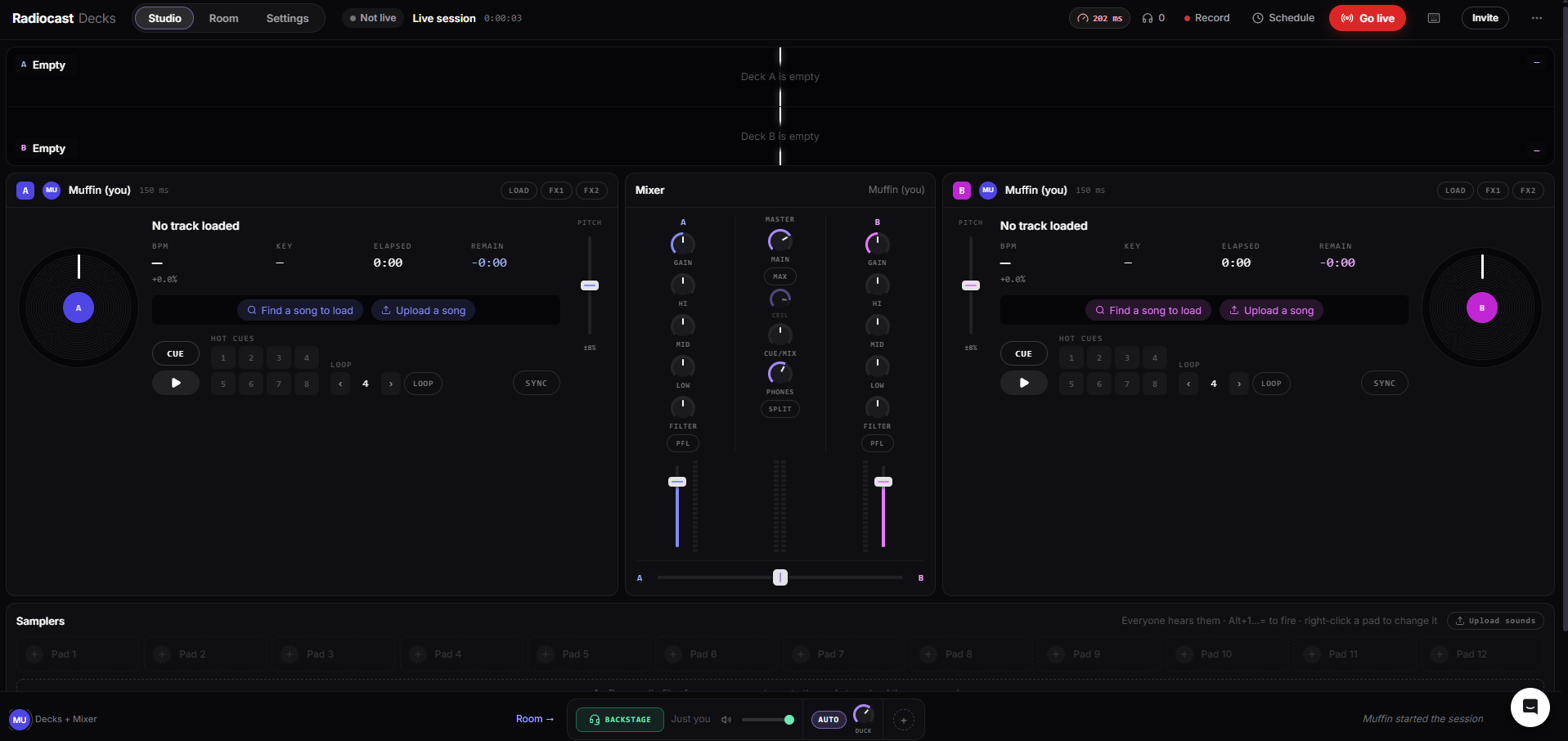
Everything a DJ expects, in a browser tab
Two full decks
BPM, key, elapsed and remaining time on every deck, with a ±8% pitch fader.
Hot cues and loops
8 hot cues per deck, and beat loops you can halve or double as you play.
Sync
Match tempos with one press, or ride the pitch yourself.
Load from anywhere
Search your station library or upload a file straight onto a deck.
- BPM
- 124.0
- Key
- 8A
- Elapsed
- 2:14
- Remain
- −3:41
A mixer with a full strip for every deck
Three-band EQ and filter
Gain, high, mid, low and a filter on each channel, with level meters.
PFL and cue mix
Cue the next track in your headphones, with a cue/mix blend and split mode.
Master ceiling
A master level with a ceiling, so your live set doesn’t clip the stream.
12 sampler pads
Load your own sounds and fire them from the keyboard. Everyone in the room hears them.
Bring your co‑hosts into the room
Open a room
Start a session and invite co-hosts. Each person can take a deck or the mixer.
Warm up backstage
Load tracks, cue mixes and check levels before anyone is listening.
Go live
One click puts the room on your Radiocast station. Record or schedule it if you like.
What's on the decks
- Decks
- 2, each with BPM, key, elapsed and remaining time
- Pitch
- ±8% fader with sync
- Hot cues
- 8 per deck
- Loops
- Beat loops you can halve or double
- Mixer
- Gain, three-band EQ, filter and PFL per channel, plus a crossfader
- Monitoring
- Cue/mix blend, headphone level and split cue
- Samplers
- 12 pads with your own sounds and keyboard shortcuts
- Session
- Backstage, go live, record and schedule
Why DJ in the cloud?
A live set on internet radio usually means DJ software on one computer, an encoder pointed at your stream, and hoping nothing on that machine changes before showtime. Decks puts the whole chain in one place: the decks, the mixer and the connection to your station.
Because it runs in the browser, you can play from any computer you sign in on, and guest DJs don't need to install anything or swap stream passwords. Invite them to the room and hand them a deck.
Decks and the rest of your station
When you go live from Decks, you're on air on your Radiocast station, so your listeners, your station website and your AirChain sound processing all pick it up. Need a new show opener first? Make one in Radiocast Imaging.
Questions about Decks
What DJs ask before their first live set on Decks.
Radiocast Decks is DJ software that runs in your web browser. You get two decks, a mixer and sampler pads, and you can go live on your Radiocast station straight from the same screen.
No. Decks runs in the browser, so there is nothing to install. You can mix with a mouse and keyboard, and the samplers have keyboard shortcuts.
Yes. Invite co-hosts into your room and each person can take a deck or the mixer. Everyone sees who is on which deck, and the latency to each person is shown so you can time your mixes.
Search for a song to load from your station library, or upload a file straight onto a deck. Each deck shows the BPM, key, elapsed and remaining time.
Yes. Every channel has PFL, so you can cue the next track in your headphones while the other deck plays out, and the room starts backstage until you choose to go live.
Yes. You can record a session from the top bar, or schedule it so your station knows when your live set starts.
One account. Everything your station runs on.
Your next set starts in a browser tab
Open a room, invite your co-hosts, and go live on Radiocast.