Make station IDs, sweepersand promos in your browser
Radiocast Imaging is a multitrack editor for radio imaging, included with Radiocast hosting. Record the read, drop in a bed and some hits, and export a finished piece at the right loudness for your stream.
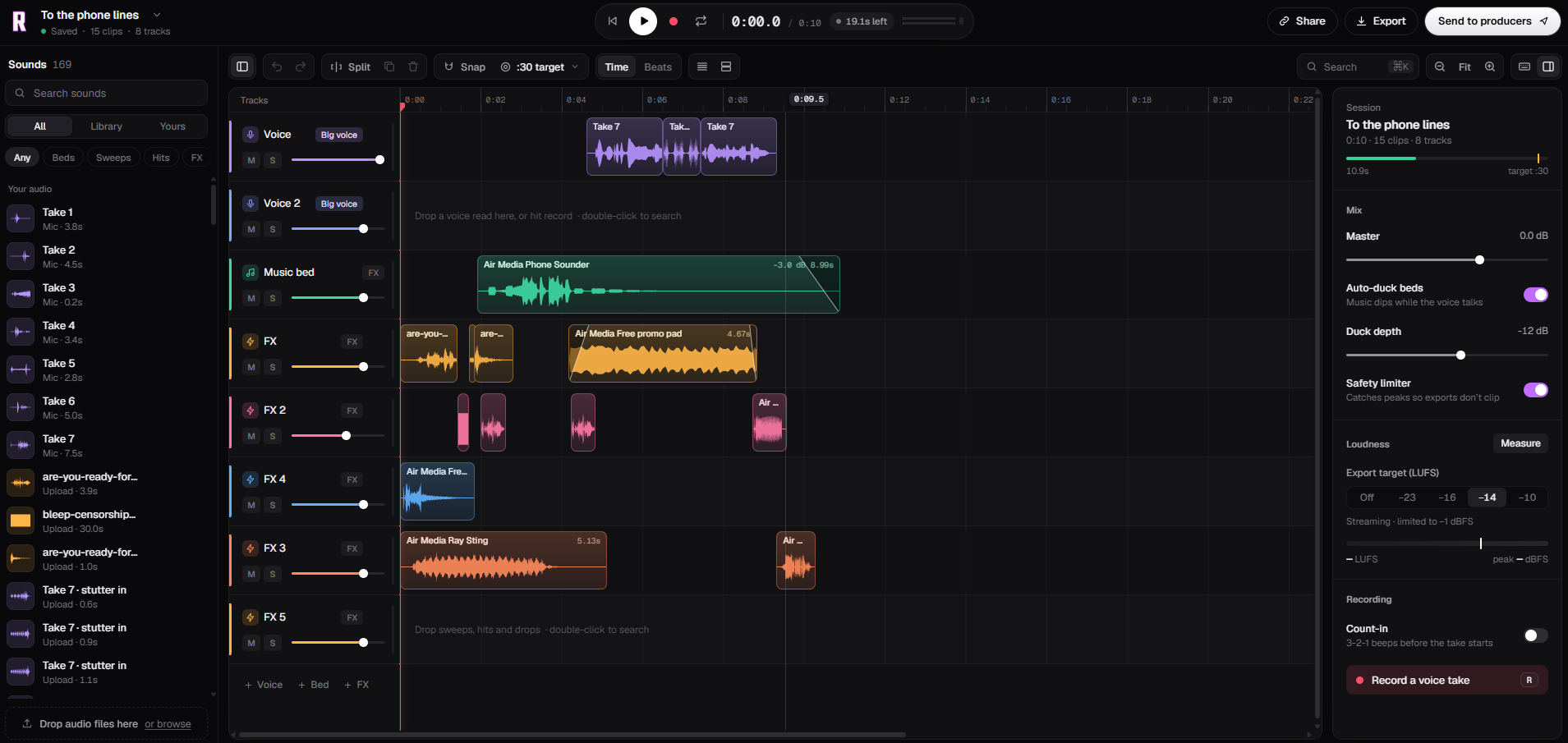
From a voice take to on-air imaging
Record the read
Record voice takes with a 3-2-1 count-in, or drop in audio you already have.
Build it up
Layer a music bed, sweeps, hits and effects from the sound library on their own tracks.
Export and send
Export at a broadcast loudness target, or share the session with your producers.
An editor built around the read
Multitrack timeline
Voice, music bed and effect tracks, each with its own level, mute and solo.
Fast edits
Split, duplicate and fade clips, with snap to time or to the beat.
Length targets
Set a target like :30 and see how much time is left as you build.
Sound library
Beds, sweeps, hits and FX to search, plus your own takes and uploads.
Finished sound without the plugin chain
Auto-duck beds
Music dips while the voice talks and comes back in the gaps. You set the depth.
Big voice
Give a read the up-front sound of station imaging with one switch.
Safety limiter
Catches peaks so exports don’t clip.
Loudness targets
Measure loudness and export from −23 to −10 LUFS, limited to −1 dBFS.
Auto-duck beds
Music dips while the voice talks
Export target (LUFS)
What is radio imaging?
Imaging is the produced audio between the songs: station IDs, sweepers, liners, promos and show openers. It tells listeners whose station they're on and gives the station a recognizable sound.
A typical piece is a short voice read over a music bed, with whooshes, hits and drops to punctuate it. The bed has to sit under the voice without burying it, and the finished file has to match the loudness of everything else on air. Radiocast Imaging handles both: auto-duck keeps the bed under the voice, and the export target sets the loudness.
Imaging and the rest of your station
Play your new imaging between songs on AutoDJ, fire it from the samplers in Radiocast Decks during a live set, or use it as a sponsor read alongside Reporter segments.
Included with Radiocast hosting
- Tracks
- Voice, music bed and FX tracks with level, mute and solo
- Recording
- Voice takes with an optional 3-2-1 count-in
- Editing
- Split, duplicate, fades, snap to time or beats
- Mix
- Master level, auto-duck with adjustable depth, safety limiter
- Export loudness
- Off, −23, −16, −14 or −10 LUFS, limited to −1 dBFS
- Sharing
- Share a session or send it to your producers
Questions about Imaging
Common questions from stations making their own imaging.
Imaging is the short produced audio that gives a station its sound between songs: station IDs, sweepers, liners, promos and show openers. It usually combines a voice read with music beds, whooshes and hits.
Radiocast Imaging is a multitrack audio editor built for making that imaging. You record or drop in voice takes, add beds and effects from the sound library, and export a finished piece for your station.
Yes. Record takes straight into a voice track, with an optional 3-2-1 count-in. Each take is saved to your sounds, so you can try several reads and keep the best one.
When auto-duck is on, the music beds dip while the voice is talking and come back up in the gaps. You set how far they dip with the duck depth control.
Pick an export target from −23 to −10 LUFS. −14 LUFS suits most streaming stations. The safety limiter keeps peaks under −1 dBFS so exports don’t clip.
Yes. Radiocast Imaging is included with Radiocast hosting, so there is no separate editor to buy.
One account. Everything your station runs on.
Cut a new station ID today
Record a read, add a bed and some hits, and have it on air this afternoon.